

Your images can look perfect to people and still give search engines too little context to understand what they show. That’s the problem visual search optimization is built to solve. It goes beyond adding keywords to alt text: you need clear imagery, useful page context, and pages search engines can crawl. Image SEO supports discovery through text and page signals; reverse image search helps identify where an existing image appears. They’re related, but they serve different purposes.
If you’re unsure what to fix first, you’re not alone. Start by reviewing images on important pages rather than treating this as another sitewide checklist. This guide explains how people use camera-based and image-led search, which image, page, and technical updates can make your content easier to understand, and how to track progress without chasing promises. The core approach is simple: make images clear, connect them to relevant page content, and keep those pages accessible to search engines.
Key Takeaways
- Visual search optimization works best as part of a broader SEO and website strategy, not as a standalone image tweak.
- Prioritize images on pages with meaningful search or conversion value instead of trying to update every asset at once.
- Alt text supports accessibility and image understanding, but keyword stuffing won’t replace useful page context or technical access.
- Use a practical workflow to audit priority pages, improve image assets, add relevant context, test, and monitor.
- Measure available image impressions and clicks alongside landing-page engagement and qualified conversions. Don’t assume every visual search platform provides direct reporting.
What Is Visual Search Optimization vs. Image SEO?
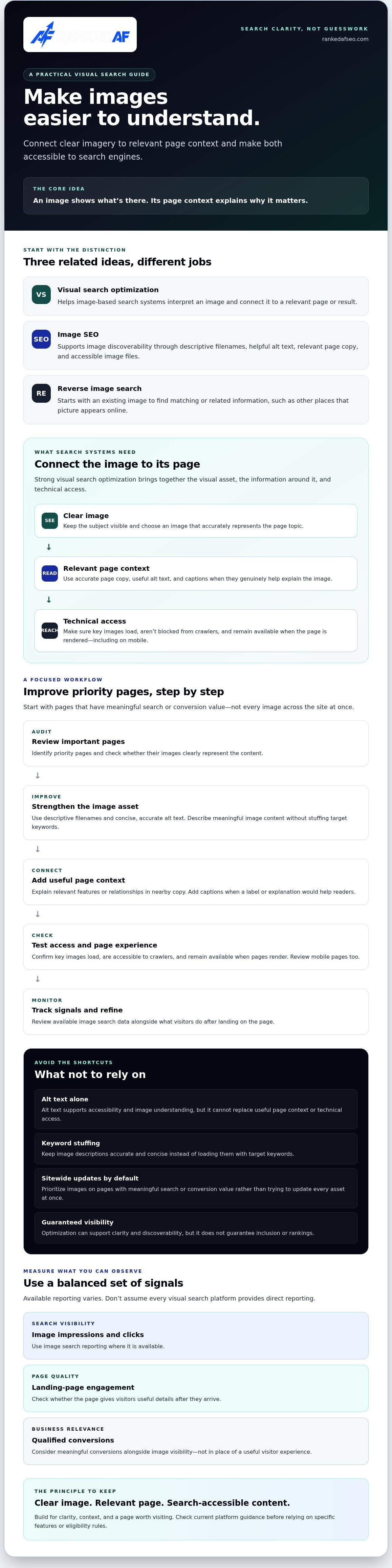
Visual search optimization is the practice of making a website’s images and related pages easier for image-based search systems to interpret and surface. The goal isn’t to force a ranking. It’s to give platforms and people clear signals about what an image shows, why it matters, and where to go for useful details.
Image SEO supports image discoverability across search experiences. It can include descriptive filenames, helpful alt text, relevant page copy, and image files that search engines can access. Visual search optimization overlaps with image SEO, but focuses more directly on helping systems make sense of the image itself and connect it to a relevant result. Standard text search starts with words. Visual search starts with an image, sometimes alongside text or voice.
How visual search differs from reverse image search
Visual search lets someone use a photo or camera view to find, identify, or explore something visually similar. For example, a person might photograph a chair they like and look for comparable styles or places to learn more. The search can help with discovery, even if the user doesn’t know the item’s name.
Reverse image search starts with an existing image and looks for matching or related information, such as other appearances of that picture online. The tools can overlap, but they aren’t identical. One may help someone explore what an image depicts, while the other may help trace the image itself.
Why visual search matters to websites
A clear, relevant image can help introduce someone to a page they might not have found through a text query. But the image is only part of the job. The landing page should explain what’s shown, answer the visitor’s next question, and make the next step clear. A striking photo that leads to a thin or irrelevant page is a missed opportunity.
That’s why visual search optimization belongs inside a broader search and website strategy, not in a silo. Prioritize images that support useful pages and meaningful business goals. Then check current platform documentation before relying on specific features or eligibility requirements. Search systems change, and no optimization can guarantee visibility. Build for clarity, context, and a page worth visiting.
How Visual Search Systems Interpret Images and Their Page Context
An image rarely stands alone in search. Systems can assess the visual asset, use surrounding page information to understand its subject, and need to access the image and page technically. Strong visual search optimization connects all three. A clear image of a hiking boot, for example, is easier to interpret when it appears on a page that accurately describes the boot, its features, and who it’s for.
An image shows what’s there; its page context explains why it matters. That connection helps visitors confirm they’ve found a relevant result and gives search systems additional clues about the image’s meaning. It also guards against a common mismatch: an appealing image that attracts attention but leads to a page with little useful information.
Image content, relevance, and descriptive context
Choose images that clearly represent the page topic. Keep the subject visible and avoid visuals that imply something the page doesn’t deliver. Then add context where it genuinely helps:
- Alt text: Describe the image’s meaningful content for people who can’t see it. Keep it accurate and concise, not stuffed with target keywords.
- Captions: Use them when a label, detail, or explanation would help readers understand the image.
- Nearby copy: Explain relevant features or relationships in the page text. Don’t repeat the same description just to add more words.
These established image SEO practices support accessibility and comprehension. They don’t guarantee inclusion in visual search results, and they’re distinct from platform-specific features that may affect how a particular service presents image-based results. Check the platform’s current guidance before building your workflow around a feature or eligibility rule.
Crawling, page structure, and image discoverability
Useful context won’t help if important content is difficult to access. Check that key images load on the page, aren’t blocked from crawlers, and remain available when the page is rendered. Review mobile pages too. Search systems need a path to the image and enough page information to interpret its role.
Image sitemaps can help expose image URLs, particularly when important assets are otherwise hard to discover through site links. Structured data can describe page content in supported cases, but it isn’t a shortcut to visibility. Use either only when it fits your site and the platform’s current documentation. Requirements and features can change.
To check whether search engines are discovering your pages, use your available webmaster reporting tools and review webmaster tools and search data. If image discoverability is part of a wider site issue, a broader SEO and website strategy review can help connect technical access, useful content, and visitor experience.
Visual Search Optimization Mistakes: Alt Text Alone Is Not a Strategy
Adding alt text is useful. Treating it as the whole image strategy is a dead end. Alt text can describe meaningful visual content for people using assistive technology, but it can’t make an irrelevant image useful, clarify a confusing page, or guarantee appearance in visual search results. Strong visual search optimization aligns the asset, its description, and the page it supports.
Image optimization supports discovery when the asset and page serve the same intent. A clear product photo can help a visitor assess an actual offering. A generic stock photo that adds no detail may simply take up space. Before polishing an image’s metadata, ask what it helps a person understand.
When image optimization helps, and when it does not
Original, relevant visuals can show details that text alone may not convey, such as a product’s shape, finish, or use. They can also make a page easier to understand when the visual directly supports its topic. But decoration isn’t automatically valuable. If a stock image could sit on any page in your industry without changing what the reader learns, it probably isn’t doing much for discovery or decision-making.
Formats, structured data, and other technical choices can support performance or help systems interpret content in the right context. None guarantees visual search placement. Focus on making the page genuinely useful, then apply technical improvements that suit the asset and your site.
Common visual SEO shortcuts to avoid
Skip the shortcuts that make content harder to trust or use:
- Repetitive, keyword-stuffed alt text: Describe each meaningful image accurately. Don’t cram the same search phrase into every description.
- Unhelpful filenames: Use clear, descriptive names that identify the subject. Avoid long strings of repeated keywords.
- Hidden text or irrelevant metadata: Don’t add information that misrepresents the image or is intended to manipulate search systems. It can confuse readers and undermine accessibility.
- Over-compression: Smaller files can load faster, but excessive compression can erase details people need to assess the image.
Test image compression and page loading on the devices your visitors use. Compare file size, clarity, and load behavior. Keep enough detail to show what matters; reduce file weight where it doesn’t improve the experience. The right balance depends on the image’s purpose. A small decorative accent has different needs from a close-up that lets someone inspect a product feature.
Make each change for a clear reason: better understanding, easier access, or a smoother page experience. That’s a stronger foundation than chasing metadata tricks.
How to Optimize Website Images for Visual Search: A Practical Workflow
Don’t start by changing every image on your site. Start where clearer visuals and stronger pages can make a difference: pages with search visibility, useful content, or meaningful conversion actions. This workflow keeps visual search optimization focused on improvements you can test and measure.
- 1. Audit priority pages. List important landing pages, product pages, and informational content. Flag images that are missing, unclear, oversized, or unrelated to the page. Record available baseline data, such as image impressions, organic visits, and relevant conversion actions, so you have a point of comparison.
- 2. Improve the image assets. Check whether each visual clearly shows what the page discusses. Use suitable dimensions and formats, and compress files where possible without removing details a visitor needs. Give meaningful files descriptive names, not keyword strings. For decorative visuals, consider whether they add enough to justify the extra page weight.
- 3. Add accurate context. Write concise alt text for meaningful images that describes what’s shown. Make nearby copy and captions useful, not repetitive. A product photo should lead to a page that explains the relevant product details; an informational visual should support the page’s point.
- 4. Test the page experience. Check that images display properly on mobile and desktop, scale appropriately, and don’t make key content difficult to access. Test loading and usability after changes. The right balance depends on the image and page, so don’t assume one compression setting or format works for every asset. For a broader look at how site usability supports action, see these web design strategies that improve conversions.
- 5. Monitor and refine. Compare results with your baseline after updates. Review available image impressions, organic visits, landing-page engagement, and relevant conversion actions. Keep changes that improve clarity or performance; revisit pages where results are flat or the experience has suffered.
Keep the process selective. A high-value page with an unclear image deserves attention before a low-priority page with visuals that already work. If you need help connecting image improvements to your wider search and website strategy, explore SEO and website support.
How to Measure Visual Search Optimization and Fold It Into SEO
Measurement starts with a clear distinction: image search performance may appear in available search reporting, while individual visual search features may not offer a separate report. Don’t treat every image-related click as proof that someone used Google Lens or another camera-based tool. Check what each platform’s reports actually include, then measure the outcomes you can observe.
Which visual search metrics can you actually track?
Review image search impressions and clicks where your reporting tools provide them. Confirm the report’s scope and filters before drawing conclusions. Then connect those signals to what happens on the relevant pages:
- Discovery: Image impressions, clicks, and organic visits to the pages you updated.
- Engagement: Useful landing-page interactions, such as navigating to related content or exploring key page details.
- Business outcomes: Qualified conversion actions that matter to your goals.
Record what you changed and when. Compare relevant pages before and after the work, using consistent reporting periods where possible. Note other changes that could affect results, such as page updates or shifts in demand. A rise in visits after image improvements is a useful signal, not proof that those changes caused the increase. Rankings and referral patterns can guide investigation, but they don’t guarantee visual search exposure.
Build visual search work into a broader SEO plan
Visual search optimization is strongest when it supports the fundamentals: pages search systems can access, content that answers real questions, and a visitor experience that makes the next step clear. Prioritize images on pages with meaningful search or conversion value. Don’t let image work crowd out crawlability, useful content, or conversion-focused page design.
Revisit your image choices when an offering changes, a page serves a different purpose, or platform guidance is updated. Keep a simple audit record: page, issue, change, date, and observed result. That gives you a practical basis for deciding what to improve next, without mistaking correlation for a guaranteed win.
If you’re reviewing how image discovery fits into your wider search plan, you can explore AI search optimization services as one part of broader SEO planning. Start with the pages that matter most, then decide what to do next based on evidence.
Make Every Image Support the Bigger Search Strategy
Visual search optimization isn’t a metadata trick or a promise of placement. It’s a practical way to help search systems and visitors understand your images, while making sure those images lead to pages worth exploring. Prioritize the pages that matter, improve image clarity and context, then track available search signals alongside engagement and qualified conversions.
The strongest results come from connecting the pieces: accessible images, useful content, and a smooth page experience. Keep reviewing that foundation as your site and search platforms change. Focus on progress you can measure, not rankings you can’t control.
Ranked AF Media Group provides SEO and AI search optimization, and builds conversion-focused websites as part of a broader digital marketing strategy. If you’re ready to connect visibility with meaningful next steps, build a search strategy that turns visibility into action. Keep improving, keep measuring, and give every visit a useful place to go.
Frequently Asked Questions
What is visual search optimization?
Visual search optimization helps search systems understand your images and connect them with relevant, useful website pages. It brings together clear image assets, descriptive context, and technical accessibility. For example, a page featuring a product should accurately explain the product shown and load its image properly. The goal is to improve discoverability and visitor experience, not to guarantee a particular position or appearance in visual search results.
How is visual search different from reverse image search?
Visual search uses an image as a way to find or explore items and related information. Someone might photograph a chair to discover similar designs or learn what it is. Reverse image search usually starts with an existing image and looks for matching copies or related appearances online. The methods can overlap, but visual search often supports exploration, while reverse image search can help trace an image.
Does alt text improve visual search rankings?
Alt text can help describe meaningful image content to people using assistive technology and provide context about the image. It’s a useful part of image SEO, but it isn’t a ranking shortcut or a guarantee of visual search placement. Write concise, accurate descriptions rather than repeating keywords. Also make sure the image fits the page, the surrounding content is relevant, and search crawlers can access the asset.
How do I optimize images for Google Lens?
Make important images clear, relevant, and accessible on useful pages. Use descriptive filenames, accurate alt text for meaningful images, and nearby copy that explains what visitors need to know. Choose appropriate dimensions and compression, then check that the page and image work well on mobile. Google Lens features and eligibility can change, so consult Google’s current documentation. No image change can guarantee Lens visibility.
Can visual search optimization help a small business?
It can support discovery when images help people understand an offering and lead to a relevant, helpful page. Start with a small set of priority pages, such as core service or product pages, rather than trying to update every image. Use visuals that show something meaningful, then monitor available search activity and qualified actions. Results depend on the platform, competition, and page quality, so treat optimization as one part of SEO.
How do I measure visual search optimization results?
Track the image search impressions and clicks available in your search reporting tools, and check which pages receive organic visits. Then review engagement and qualified conversions on those pages. Document what you changed and when, and compare results over time. A change that happens alongside better performance doesn’t prove it caused the improvement. Some visual search platforms may not provide specific reporting for camera-based discovery.
Is visual search optimization the same as image SEO?
No. Image SEO uses practices such as descriptive filenames, useful alt text, and relevant page content to improve image discoverability across search experiences. Visual search optimization overlaps with image SEO but also focuses on helping systems interpret the visual content itself and connect it to a relevant page. Both benefit from clear images, useful context, and crawlable pages. Neither guarantees visibility in a particular platform’s results.


